Docs · MCP connector
Use Visiflow inside Claude
Connect your Visiflow account to Claude and ask, in plain words, how your website is doing. Claude sets up your funnel, checks the install and shows tables and charts right in the chat.
Connector URL
https://visiflow.me/mcpSet up in 3 steps
Add the connector
In Claude, open Settings → Connectors → Add custom connector. Name it Visiflow and paste the URL above.
Sign in and tap Allow
A Visiflow page opens. Check that the email shown is the account that owns your sites, then tap Allow.
Ask in plain words
Start a new chat and paste one of the prompts below. Claude uses your Visiflow data and shows the result in the chat.
Using Claude Code (terminal)
Add the connector with one command, then run /mcp inside Claude Code and sign in:
claude mcp add --transport http visiflow https://visiflow.me/mcpClaude Code can also edit your code: ask it to install Visiflow and it follows the instructions from the connector.
Prompts you can copy
Tap Copy and paste into Claude. Replace example.com with your site.
Create a Visiflow site for example.com. Then give me step-by-step instructions to install it, including a prompt I can paste into my coding assistant. When I tell you it is published, check that it is working.
Use the Visiflow connector to get the install instructions for example.com, then add the tracking code to this project and tell me which files you changed. After I publish, verify the installation.
Look at the pages and events my site already receives and propose a conversion funnel. Show me the steps and wait for my OK before saving it.
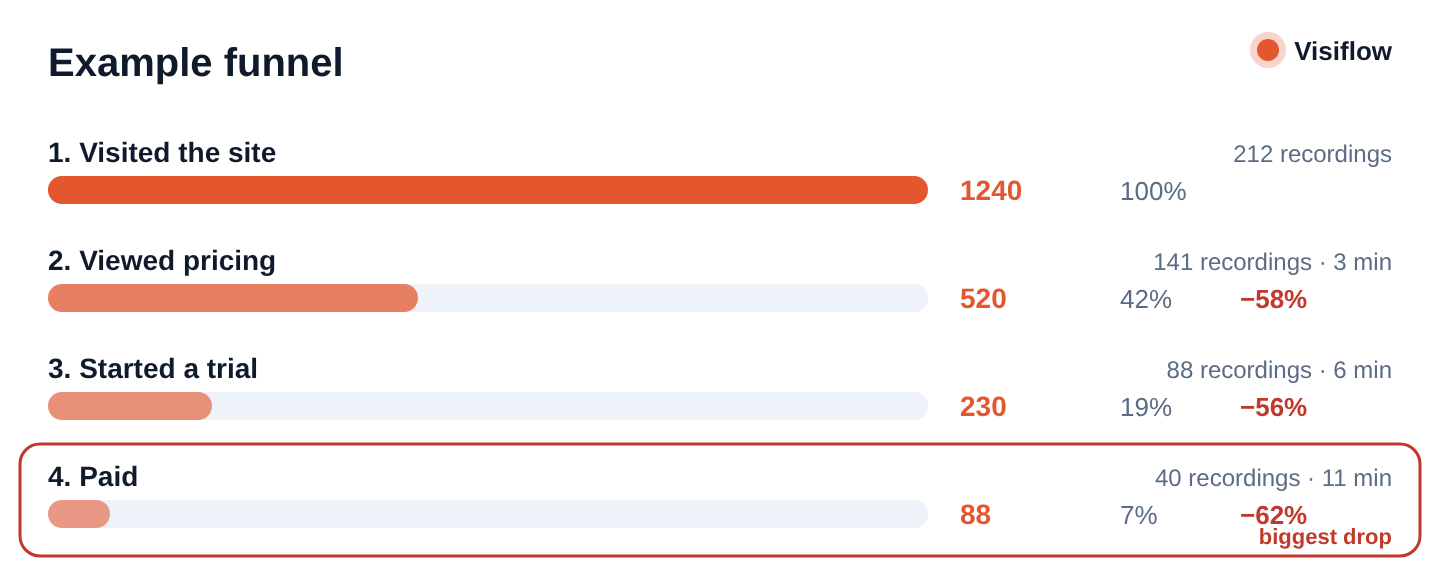
Show my funnel for the last 30 days: a table with visitors, drop-off, recordings and time per step, plus the funnel chart. Explain in plain words what is happening at each step.
Which funnel step loses the most people? Show me which recorded sessions I should watch to understand why.
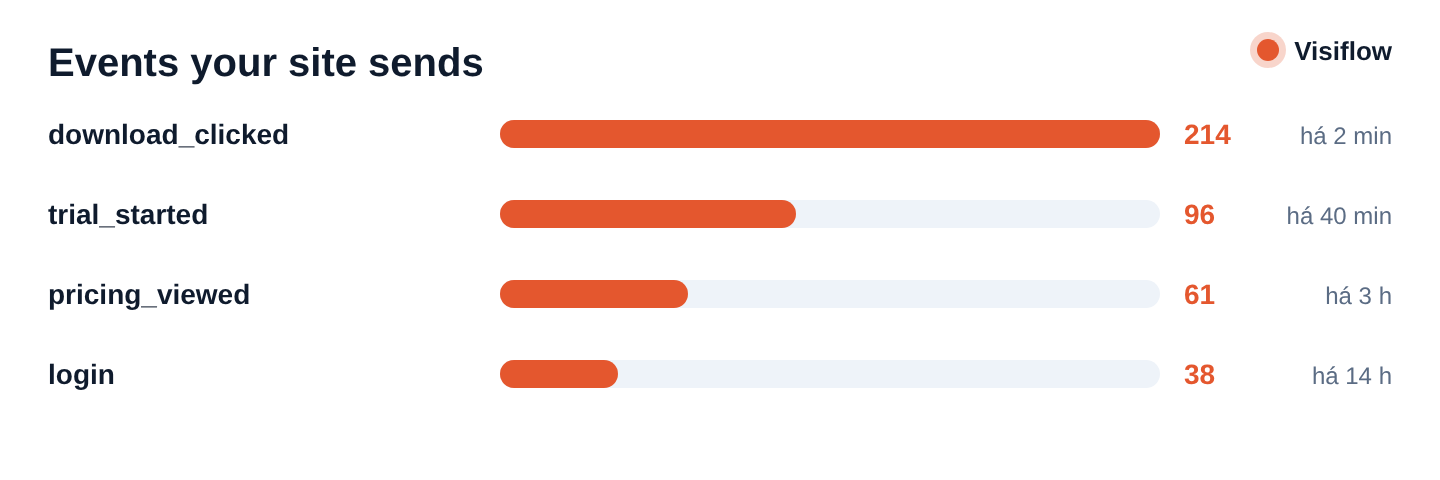
Which events is my site sending? Show a chart and a table.
Show the click heatmap of my pricing page on mobile.
Is Visiflow receiving data from my site? If not, tell me what is missing.
What you see in the chat
Claude answers with a plain-words summary, a table and a chart. These are examples with sample data.
What Claude can do
These are the tools the connector gives Claude. Claude picks them for you.
| Tool | What it does | Changes data? |
|---|---|---|
list_sites | Lists your sites and your role on each. | No |
site_create | Creates a site and returns its tracking snippet. | Yes, after you confirm |
site_install | Gives step-by-step install instructions and a prompt to paste into a coding assistant. | No |
site_verify | Checks that the code is on your page and visits are arriving. | No |
site_check | Shows whether data is arriving, recent events and rejected domains. | No |
overview | Sessions, visitors, time on site and traffic sources. | No |
funnel_report | Funnel table, plain-words summary and chart. | No |
dropoff | Recorded sessions of people who stopped at a funnel step. | No |
sessions | Lists recorded sessions with filters. | No |
screens | Most viewed and clicked pages. | No |
heatmap | Click and scroll map of a page, per device, with an image. | No |
visitor_trail | The path of one visitor across pages, forms and actions. | No |
paths_catalog | Pages that already received visits, to build funnel steps. | No |
events_catalog | Events your site sends, as a chart and a table. | No |
funnel_check | Checks a draft funnel against your real data without saving. | No |
funnel_save | Saves the funnel of a site. | Yes, after you confirm |
Privacy and control
- Your own sign-in. Claude uses OAuth with PKCE. It only sees what your account can see in the dashboard, with the same roles (viewer, editor, owner).
- Changes need your OK. Creating a site and saving a funnel only happen after you confirm in the chat.
- Limited on purpose. The connector cannot delete sites, change billing or invite people.
- No video. Claude gets numbers, tables, charts and lists of sessions. You watch the recordings in the dashboard.
- 90 days. The connection lasts 90 days, then you sign in again.
Questions
Which apps work with the Visiflow connector?
We test with Claude (custom connectors) and Claude Code. Other apps that support remote MCP servers with sign-in should work with the same URL, but we have not tested them.
Does it cost extra?
No. The connector is part of your Visiflow account. Your plan limits are the same as in the dashboard.
Can Claude change or delete things?
It can create a site and save a funnel, and only after you confirm in the chat. It cannot delete sites, change billing or invite people.
Which account should I choose when I sign in?
The one that owns your sites. The sign-in screen shows the email before you tap Allow. If Claude says you have no sites, you probably connected a different account.
Does it work for any website?
Yes. Visiflow works on any site where you can add one line of code. Claude can give you that code and check it is working.
What is MCP?
The Model Context Protocol (MCP) is an open standard that lets AI apps use tools from other products. The Visiflow connector is a remote MCP server.
Troubleshooting
“Couldn’t register” or sign-in fails
Check that the URL is exactly https://visiflow.me/mcp with nothing after it, then try again in a minute.
Claude says I have no sites
You probably signed in with a different account. Remove the connector in Claude, add it again and check the email shown before you tap Allow.
No charts, only text
Some apps do not show images. The tables and the summary still appear.
Claude cannot create or save
Your role on that site may be viewer. Ask the site owner to make you an editor.